Introduction |

|

|
|
Introduction |
|
|
Introduction |
|
|
|
Introduction |
|
|
|
|
||
ContentsWhat's New in 10
Setup Factory 10's scripting engine was updated. Since Setup Factory 8 brought us Lua 5.1, this new release we got even more features:
| • | yieldable pcall and metamethods |
| • | new lexical scheme for globals |
| • | ephemeron tables |
| • | new library for bitwise operations |
| • | light C functions |
| • | emergency garbage collector |
| • | goto statement |
| • | finalizers for tables |
| • | integers (64-bit by default) |
| • | official support for 32-bit numbers |
| • | bitwise operators |
| • | basic utf-8 support |
| • | functions for packing and unpacking values |
A more detailed description of the new features and changes in the Lua language and API can be found online, here:
Changes from Lua 5.1 to Lua 5.2: https://www.lua.org/manual/5.2/readme.html#changes
Changes from Lua 5.2 to Lua 5.3: https://www.lua.org/manual/5.3/readme.html#changes
This actions plugin can be used, on 64-bit operating systems, to access folders controlled by the File System Redirector and to read and write registry keys that are subject to Registry Redirection. These functions can also be used on 32-bit operating systems. The plugin is available for 32-bit and native 64-bit setup runtimes.
Setup Factory did not previously feature a plugin which could handle zip archive compression and decompression from a 64-bit setup. By adding this plugin to the project, files can now be created or decompressed when building native 64-bit setups.
Now you can read or write UTF-8 or Unicode encoded text files during the installation or removal of your product.
Should you require building a setup with a dark interface, Setup Factory 10 is now able to help you. Select the "Dark" theme, and modify as needed or desired to customize your interface even further.
While Setup Factory is not fully Unicode compatible, we made efforts to help end users who may download the setup to a path containing Unicode characters in a non-Western script, like Greek, Russian, Chinese, Arabic, etc. For example, the installer may have been downloaded to a path like
C:\Users\[Username]\Downloads
where the [Username] may contain non-Western characters. Until now, the setup could not be started from such a folder, resulting in an error like this:
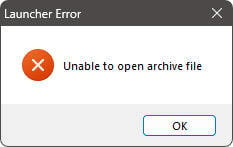
We heard our users, and now with Setup Factory 10 we provide a workaround for this issue, allowing the installer to start from a "safe" location, a path without non-Western characters. The launcher detects the Unicode path and provides a safe environment for the setup runtime.
Please note that creating shortcuts on the user's desktop, or installing files into the user's profile will still fail, as the path would again contain Unicode characters which cannot be processed correctly by the actions and Lua scripting engine. If the files are to be installed for "All Users" and shortcuts are created on the Common Desktop, then no issues are expected. If you target clients in countries using non-Western characters, make sure you test your setup carefully before release.
While we were able to help you with single file setups on Unicode paths, the approach will not work if you distribute your installer as a multi-segment setup. If the files reside in a folder with non-Western characters, then an error like this will be displayed.
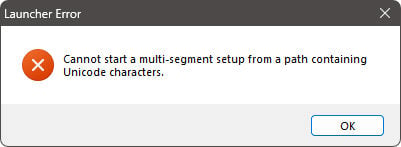
While not perfect, we feel that this is much clearer than the previous error dialog, as it explains what is going on. If all the required files are moved to a folder with only Western characters, the setup will start up and process your files correctly.
We added a new Design-time Constant which will return the current day as a two digit number, in the same manner as the previously available #CURRENTMONTH2#.
Action Plugins are one of the best features of Setup Factory. They allow 3rd party software developers to extend and expand the product in an extremely integrated and seamless fashion. By simply dropping a plugin into your project, you can easily save yourself hours of work and add significant functionality to your setup. The great news is that with Setup Factory, plugin developers can now fully leverage the advantages of the Lua 5.3 language. The Plugin SDK v3 is available for free download on the indigorose.com website.
Upgrading to Setup Factory 10 is almost completely hassle-free. Simply open up your Setup Factory 7.0 / 8.0 / 9.0 project files and continue development. See the Changes to Setup Factory topic for information about minor changes that may be required.
Learn More: Indigo Rose Software - Setup Factory - Buy Now - Contact Us